Your main agent coordinates specialist subagents for scientific research and business analysis. They search source databases, run code in R and Python, and write reports with citations. You review the results and working files in one canvas.
For biotech and pharma teams, technology-transfer offices, consultants and investors. Decision support, with judgment and approval remaining with you.
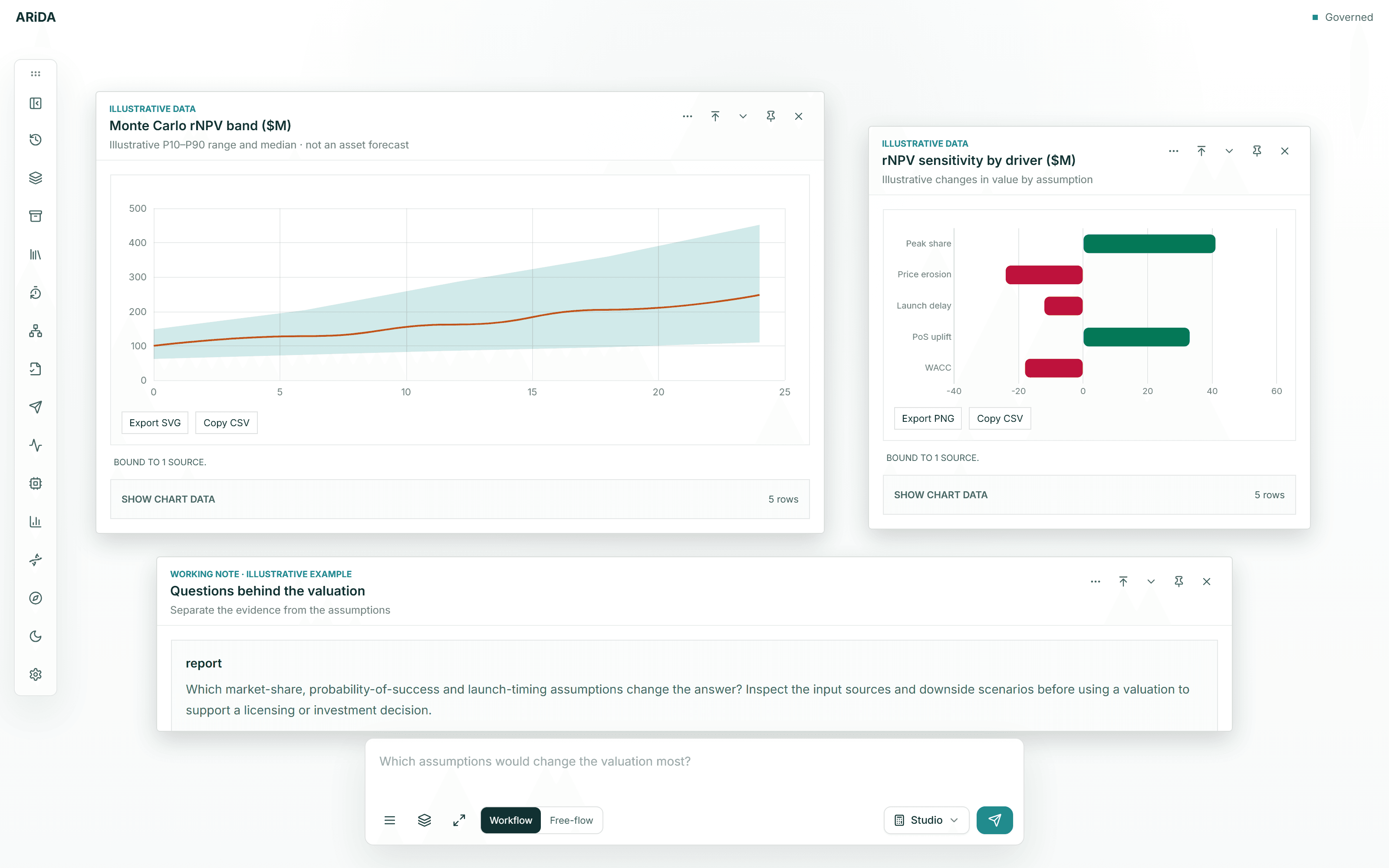
Asset valuation & licensing
What is the opportunity worth, and on what terms?
Connect development risk, cost, timing and commercial assumptions to value. Examine the effect of upfront payments, milestones and royalties instead of treating the headline valuation as the answer.
rNPV · Monte Carlo scenarios · Sensitivity analysis · Deal assumptions
Portfolio & capital allocation
Which programs deserve the next commitment?
Compare opportunities against cash, capacity and strategic priorities. Explore shared scientific risk, diversification and the consequences of advancing, delaying or partnering a program.
Bring disease biology, unmet need, clinical feasibility, differentiation and economics into the same assessment. Keep evidence gaps visible when comparing indications and development paths.
Understand competitors, clinical readouts, standards of care and emerging technologies. Examine how a new result or market development changes the positioning of an asset or platform.
How could a discovery become a development opportunity?
Explore applications for a technology, map patent and competitive evidence, and research potential partners. Build an opportunity brief that makes both the promise and the outstanding work clear.
Investigate scientific, clinical, IP and commercial assumptions together. Compare an asset, pipeline or platform with alternatives, and prepare the unresolved questions for expert and investment review.
A headline value is only a starting point. Inspect the assumptions, downside and alternatives. Compare what the science supports with what the economics require.
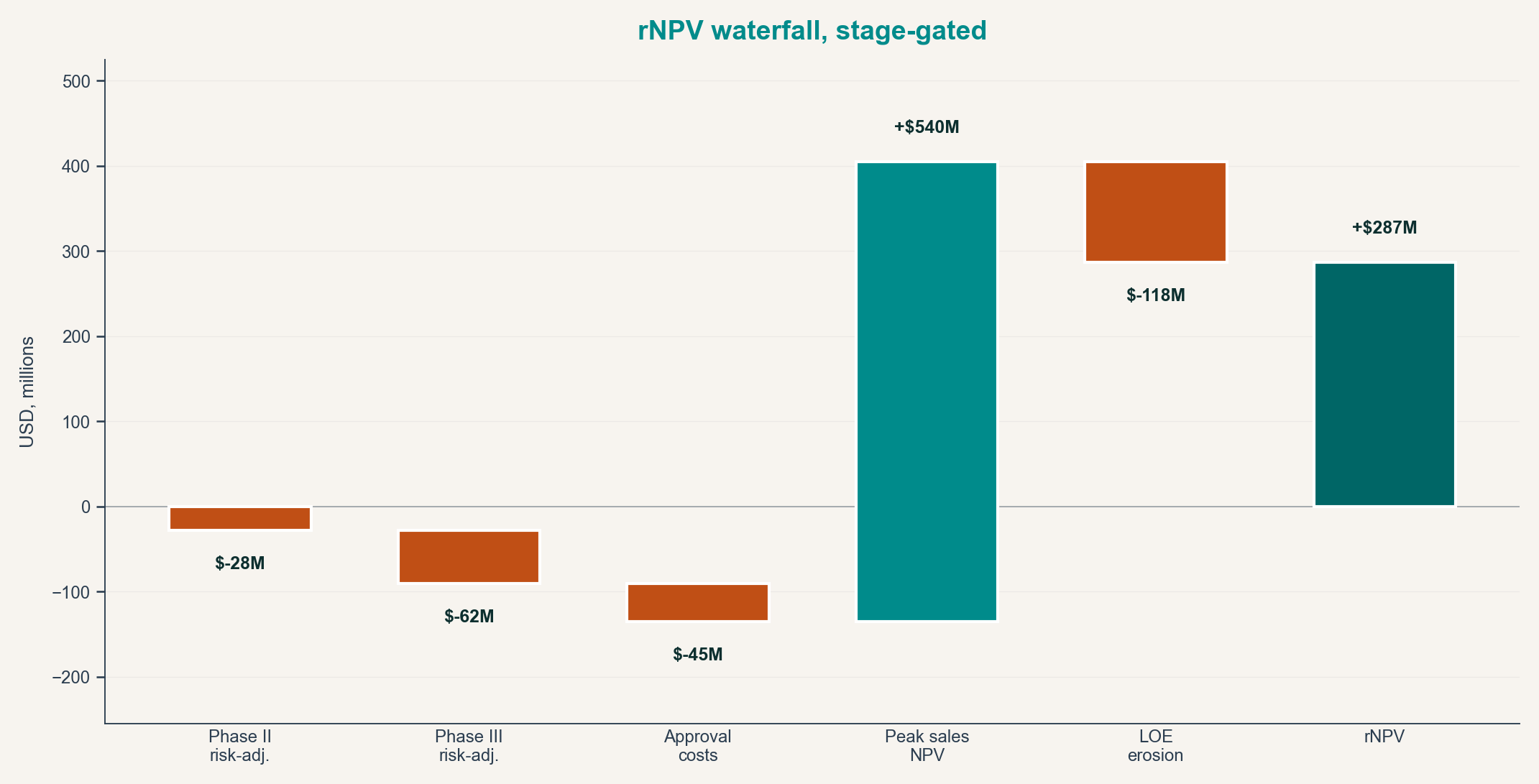
Stage-gated rNPV
Scientific or business input
Development timing, cost, revenue, probability, price and transaction-structure assumptions.
Calculation or analytical consequence
Risk-adjusted cash flows and stage transitions across the program.
Decision question
What is the asset worth, what can we pay and which assumptions set the walk-away point?
Evidence stays visible. Trace the premise back to its sources and keep contradictory findings in view.
Assumptions stay explicit. Review probability, timing, cost, revenue and constraints before relying on an output.
Uncertainty stays in the case. Compare scenarios and missing evidence instead of treating one estimate as certainty.
Scientific research & analysis
Analyze your data. Investigate the biology.
Bring your experimental files and the question you want to test. ARiDA prepares and runs an analysis, then helps you interpret it against the literature and biological databases.
Start with the experimental design
Define the comparison and biological replicates before fitting. Review diagnostics, effect sizes and multiple-testing results with the complete tables.
Keep the analysis files
Inspect the code, settings and figures alongside the results. Supported methods also return fitted R objects, input hashes and software versions.
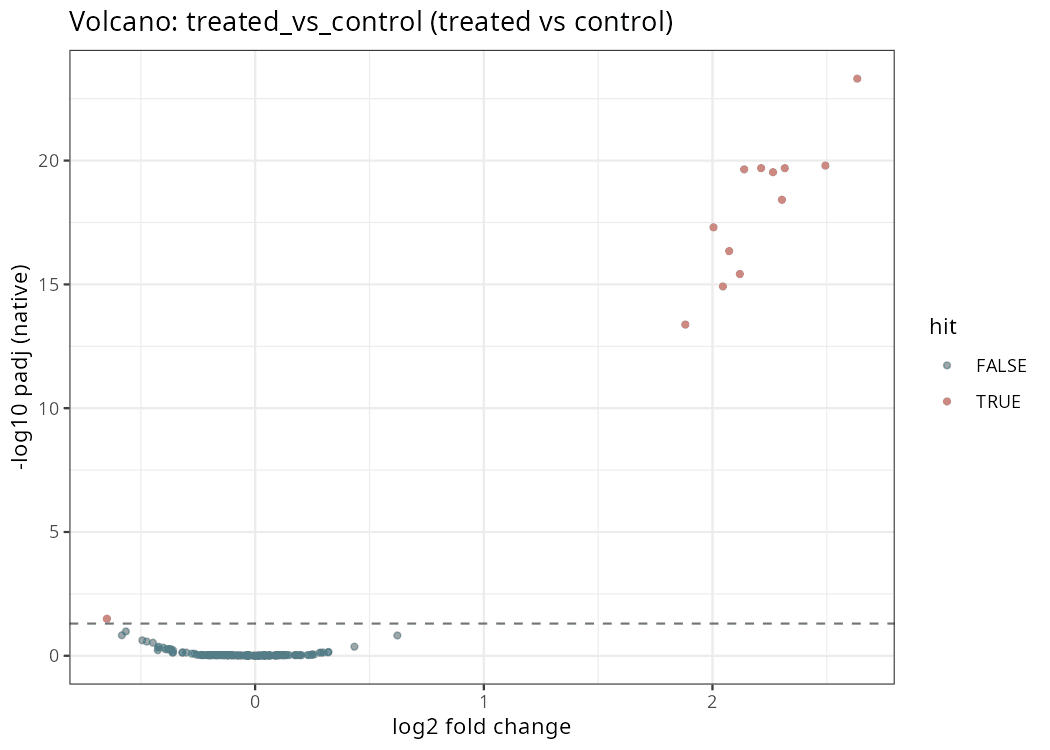
Bulk RNA-seq · edgeR
Treated versus control, adjusted for batch. Computed in ARiDA from 160 synthetic features and eight samples.
Full results · Sample QC · Fitted R model
Paper verification and citation checks
Check papers against PubMed
PMID verification queries PubMed for the paper’s title, authors, journal and date. These records help you catch invented references or details attached to the wrong paper.
Trace citations to the evidence
Writer reports link numbered citations to source records and specific findings through a citation map. Validators check reference details, evidence links and supplied quotes; writer contracts check the report and map together.
Bioinformatics methods
Choose a method, or describe the study and ask ARiDA to help select one.
Choose a method for your files, check and prepare reads, or align sequences and infer evolutionary trees.
Other research methods cover assay QC and dose-response, PK, biochemical kinetics, microscopy, statistical and survival analysis, pathway enrichment, cheminformatics and structural biology.
R, Bioconductor and Python
Run a packaged method or adapt the code to your study. The environment supports compatible libraries and document tools for lab reports, manuscript drafts and presentations.
DESeq2
edgeR
limma
Seurat
Signac
SciPy
RDKit
Biopython
Large whole-genome pipelines, GPU work and very large datasets need suitable external compute.
How the agents work
A main agent and a specialist team.
In Free-flow, your main agent scopes the task and delegates work as needed. Independent tasks can run in parallel; you can change direction while the investigation is underway.
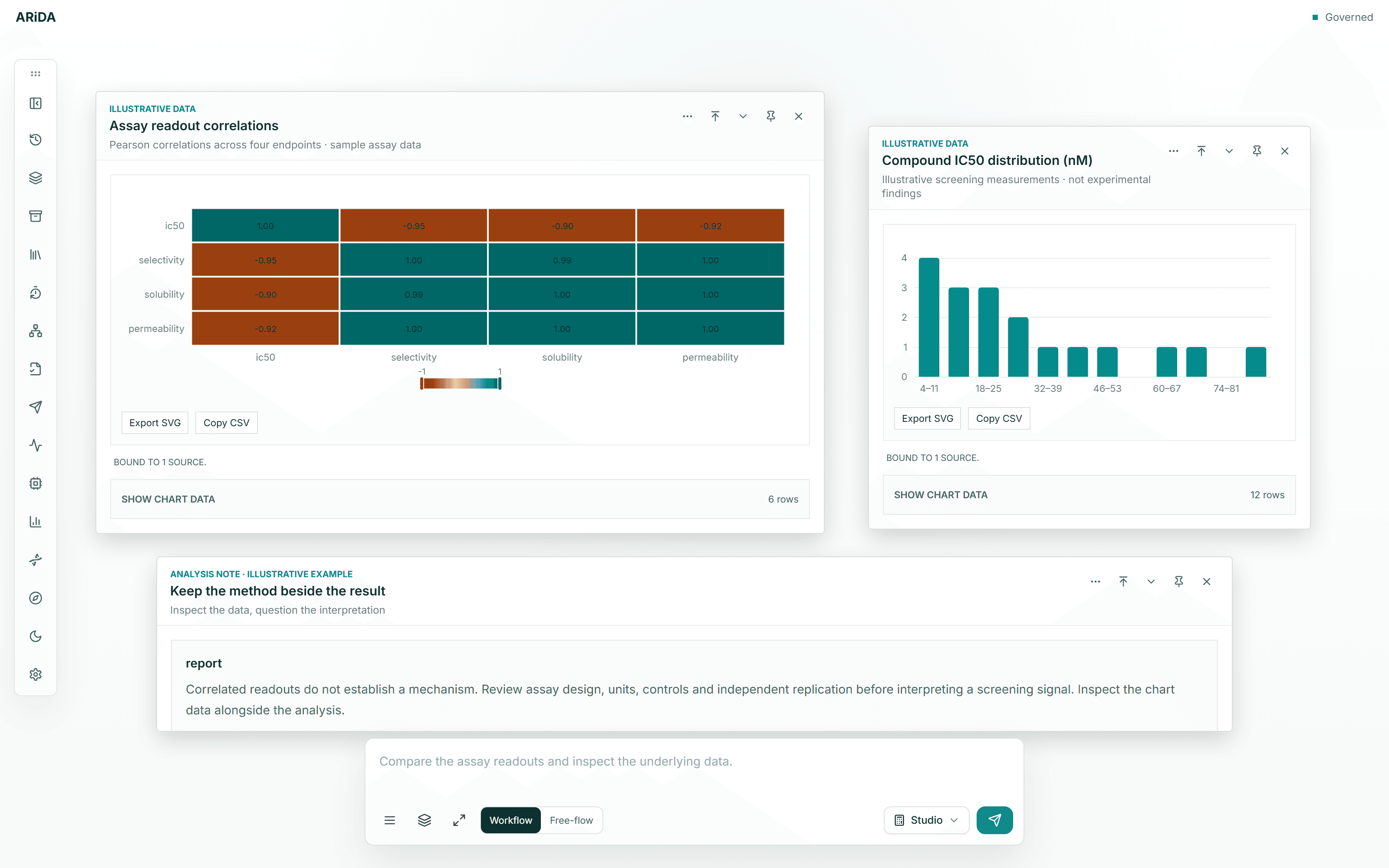
Actual ARiDA interface. Illustrative assay data.
You set the question
Bring files, choose a method or describe the result you need. Tell the main agent when the scope changes.
Specialists research and analyze
Call on literature, biological-database, SQL, web, clinical, patent, regulatory and grant specialists, with separate agents for data analysis, valuation and writing.
Inspect a result and keep working
Open the tables, code and reports in the canvas. Ask for a revision or resume a specialist with a follow-up; the working files remain with the conversation.
For example, a literature specialist can collect papers while the analysis agent works on your dataset. Once their work is ready, a writer can prepare a report with citations to the sources and results.
Governed Studios
More structure, when you need it.
For a defined study, use a methodology with explicit inputs, assumptions and output checks. Studios complement open-ended work; they do not prescribe how every question must be approached.
Assemble target identity, disease biology, mechanism, tractability, safety and clinical precedent. ARiDA shows which evidence strengthens the thesis, which evidence blocks it and what should be learned next.
Should this asset advance, defer, stop, be licensed or be passed?
Keep molecular developability, mechanism, clinical evidence, safety, competitive analogues, regulatory context, IP evidence and business assumptions inside the same asset case.
Compare scientific admissibility, clinical feasibility, differentiation, economics and execution constraints without hiding a weak dimension inside one composite score.
What is the defensible value range, and what moves it?
Connect scientific and clinical assumptions to rNPV, Monte Carlo distributions, real options and value of information. Reviewers can inspect an assumption and rerun the affected case.
Evaluate assets against strategy, cash, capacity, shared scientific risk, timing and available options. Keep credible alternatives and dominated choices visible for the committee.
Connect patent-family, ownership, claim-theme, exclusivity and proceeding evidence to lifecycle, transaction and competitive questions. Patent Studio prepares evidence for business and counsel review. It does not provide legal opinions or clearance conclusions.
Patent-family and ownership map
Connected intelligence
Follow the evidence across disciplines.
Follow a target from biological evidence to trials, patents and company activity. Database tools, web research and your own files supply different parts of that investigation.
Evidence sources by topic: Targets: Open Targets · UniProt · NCBI Gene; Drugs: ChEMBL · PubChem · openFDA; Compounds & assays: ChEMBL · PubChem · your data; Clinical trials: ClinicalTrials.gov · AACT; Patents & IP: Google Patents · EPO · USPTO; Literature: PubMed · PubMed Central; Diseases & evidence: Open Targets · Ensembl; Companies & deals: SEC EDGAR · company reports.
Some sources need credentials or configured databases. Full-text access and connected files remain subject to permissions and licensing.
Working files & deliverables
Leave with work you can use.
Move from the working analysis to a research report, client presentation or decision brief. These are actual files made with scientific and document tools available in ARiDA.
01 / 05
Look closely at the result.
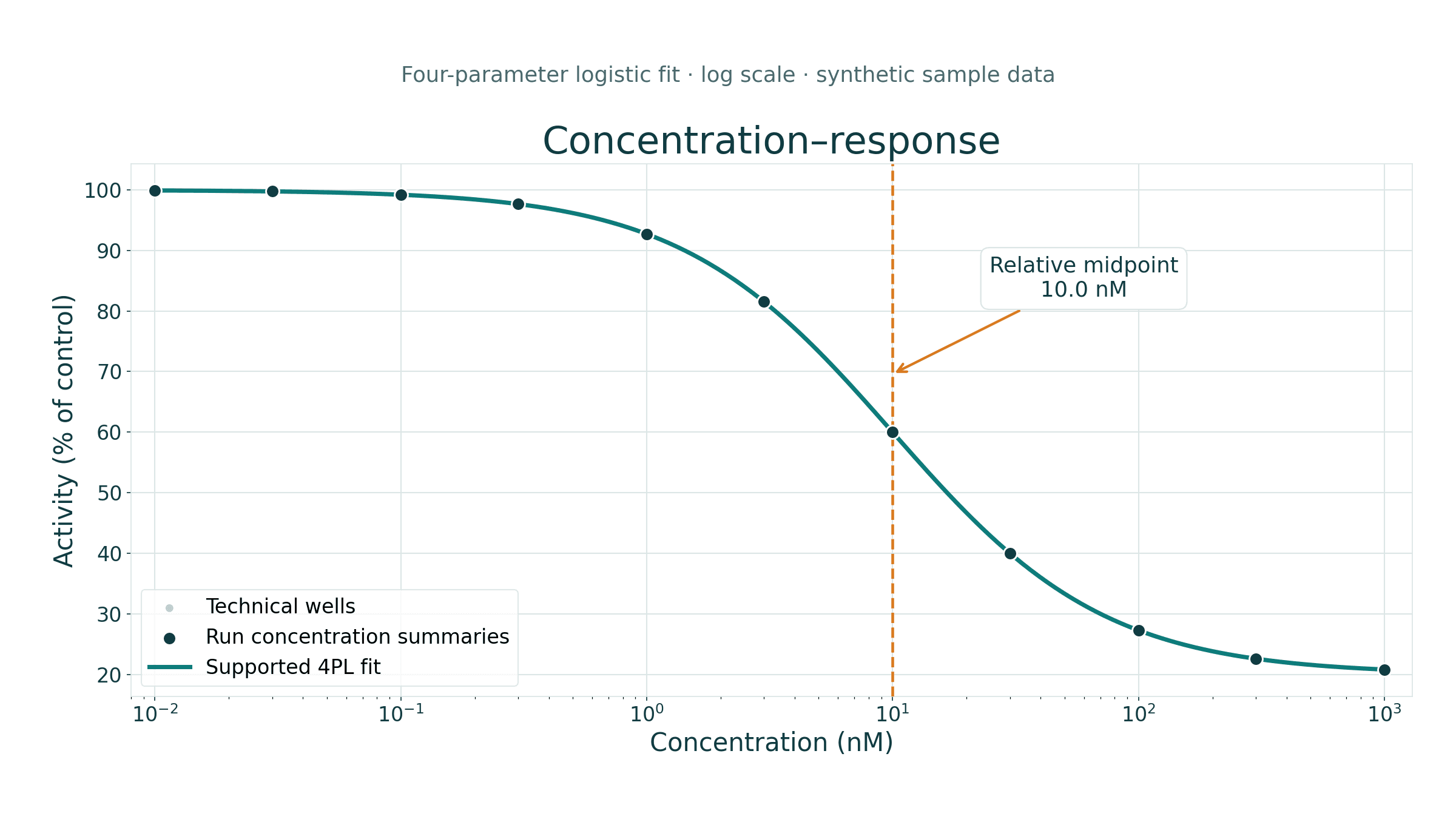
Fitted curves, readable axes and the method behind the numbers. Keep the figure and the analysis that produced it.
PNG · analysis data · code
Figures
Dose-response analysis · synthetic assay data
Scientific examples use synthetic data. The clinical comparison uses trial registry records.
Continuity & monitoring
Stay with the work as the facts change.
Set up recurring research, follow trial readouts or keep track of competitors and patent activity. Receive the update, ask what it means and return to the underlying work.
Web
The full canvas and working files.
Email
Scheduled briefings and follow-up questions.
Telegram
A conversation you can continue on the move.
Microsoft Teams
Updates in the place your team works.
Inspectability & review
Know what supports the conclusion.
Useful decision support makes the reasoning available for challenge. It does not remove the need for scientific, financial or legal judgment.
Model-provider privacy. Our standard Fireworks inference uses zero data retention and does not use your prompts or responses for model training. ARiDA saves your chats and files separately so you can return to your work.
Sources & citations
Inspect the source material. Bibliographic and report-writing checks help catch invalid references and inconsistent citations.
Assumptions & calculations
Review the inputs, code and scenarios behind a result. Separate evidence from an assumption that still needs testing.
Gaps & decision rules
Governed studies retain unmet requirements and methodology-specific checks. Missing evidence must not become a fabricated conclusion.
Data & responsibility
Use authorized material and review access and data-handling requirements. Your team retains judgment, review and approval.
Can I use ARiDA for scientific research and business decisions?
Yes. Work can range from a literature question or dataset analysis to a competitive landscape, indication assessment, valuation or portfolio comparison. Researchers, TTOs, consultants, biotech and pharma teams can use the same underlying workspace. You do not need to turn a research question into an investment case.
Does every task follow a fixed workflow?
No. Free-flow lets you explore, bring files, change direction and ask follow-up questions. Reusable methods can guide a particular task. Governed Studios add defined inputs, calculations and review requirements for supported studies; they are an option, not a prerequisite for using ARiDA.
What is the difference between Free-flow and a Studio?
Free-flow is an open-ended conversation with tools, specialist agents and a persistent canvas. A Studio applies a defined methodology to a particular scientific or business question, with explicit assumptions, evidence requirements and output checks. Studio availability depends on the beta configuration and the inputs required for the study.
Can I bring my own data, papers and models?
Yes. Upload supporting files and work with them alongside available sources. ARiDA can write and run analysis code, create editable documents and retain the working files. Use material you have permission to process, and discuss data handling and access requirements with us before uploading sensitive information.
How can I check the work?
Inspect the sources, code, assumptions and working files behind an output. Bibliographic and report-writing checks help catch invalid references and citation inconsistencies. Governed studies add methodology-specific validation.
Does ARiDA replace scientific, financial or legal judgment?
No. ARiDA supports the analysis and preparation behind a decision. Your team remains responsible for the assumptions, interpretation and approval. Patent research prepares evidence and questions for qualified counsel; it is not a legal opinion or a clearance conclusion.
How do I try the beta?
Request access and tell us what you would like to work on. We will follow up by email to discuss access and the capabilities relevant to your work. Existing users can sign in directly.
ARiDA is in beta.
Bring the question you’re working on.
A scientific study, a client brief, an asset or a strategic decision. Let’s explore how ARiDA can help.